ATS Resume Checklist: 15 Checks Before You Hit Submit
Fifteen ATS checks to run before you hit submit — formatting, keywords, and content. Catch the parsing and wording problems that hide even strong resumes.
Every day, thousands of strong candidates go unnoticed not because their experience is weak, but because their resume never surfaces in the system. The fix is mechanical. ATS parsing follows rules, and you can check your resume against those rules in about ten minutes.
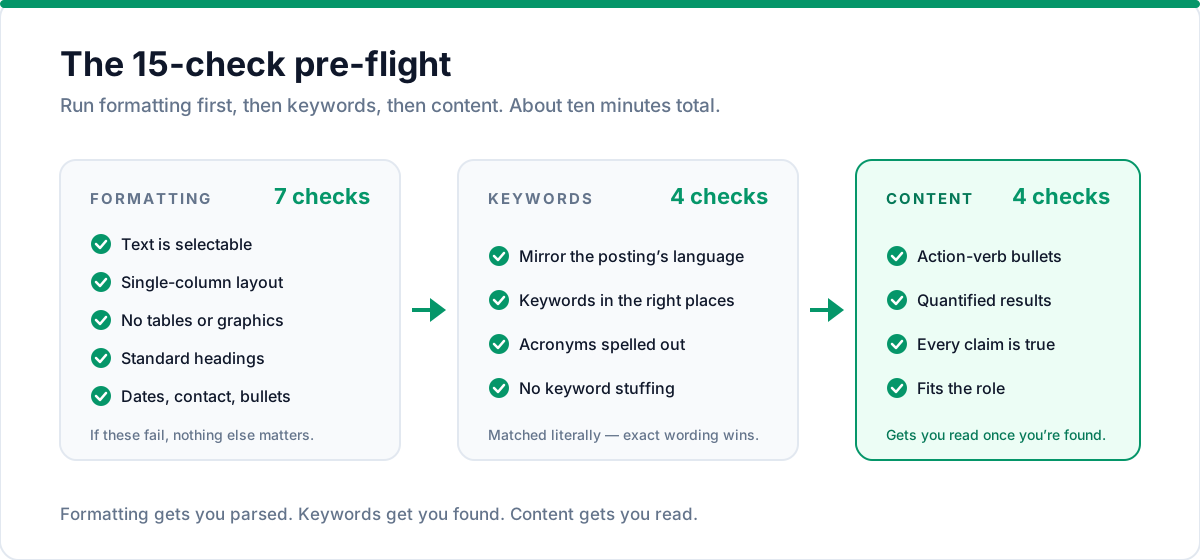
This is that checklist. Fifteen checks across three areas — formatting, keywords, and content. Work through them before every single application.
And "before every application" matters: SHRM's 2025 recruiting benchmarking report found a median of just two days between a job being posted and screening starting. Your resume has to parse correctly on the first try — there's no time to revise a file that silently failed.
Formatting checks
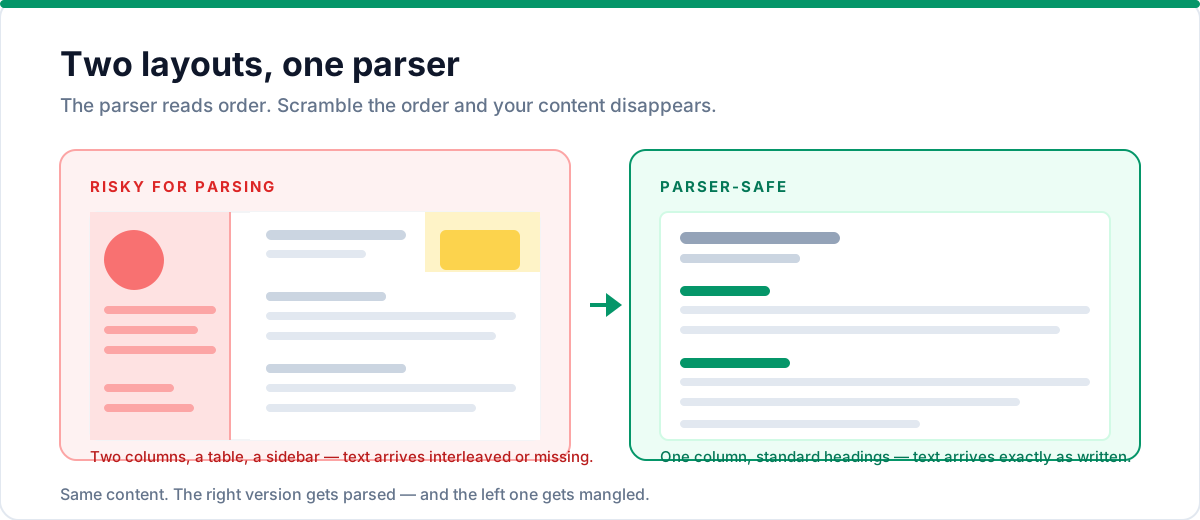
These checks are about one thing: can the ATS parser extract clean, correctly-ordered text from your file? If formatting fails, nothing else on this checklist matters — there's no content to index. Run these first.
1. Text is selectable
Open your resume file and click-drag across a paragraph. If you can't select the text, it's an image — and the ATS can't read it. Fix: re-export as a true text PDF or DOCX. Never upload a scan or image-based export.
2. Single-column layout
Does your resume read top-to-bottom in one column? Sidebars and two-column layouts scramble in parsers. Fix: convert to a single-column layout, or use a template built ATS-safe like the ones in Talent & Story.
3. No tables, text boxes, or graphics
Scan for anything a parser can't handle: tables, floating text boxes, icons, logos, charts. Fix: replace any table-based structure with plain text and simple bullets. (If your resume tool uses tables for layout, this is a red flag — check the parsed output.)
4. Standard section headings
"Work Experience," "Education," "Skills." When a parser looks for your job history, it looks for recognizable labels. Fix: use standard names for standard sections. This matters most for Experience and Education.
5. Consistent date formats
"MMM YYYY – Present" everywhere, or "MM/YYYY – Present" everywhere — pick one and stick to it. Inconsistent dates confuse parsers and recruiters alike. Fix: normalize every date range to a single format.
6. Contact info at the top
Name, email, phone, and city should appear in the first block of the document — not in headers, footers, or a decorative corner. Fix: move contact details into the top of the body.
7. Simple bullet points
Standard bullets (•) and dashes (-) only. No arrows, emoji, or special glyphs. Fix: replace any decorative bullet characters.
If you're not sure whether your layout passes these, our complete ATS-friendly format guide walks through every layout rule in detail.
Keyword checks
8. You've mirrored the job description's language
If the posting says "project manager," your resume should say "project manager" — not "program lead." Keywords are matched literally. Fix: for each application, align your title and skills with the exact wording in the description. Our tailoring guide shows the full 10-minute method.
9. Keywords appear in the right places
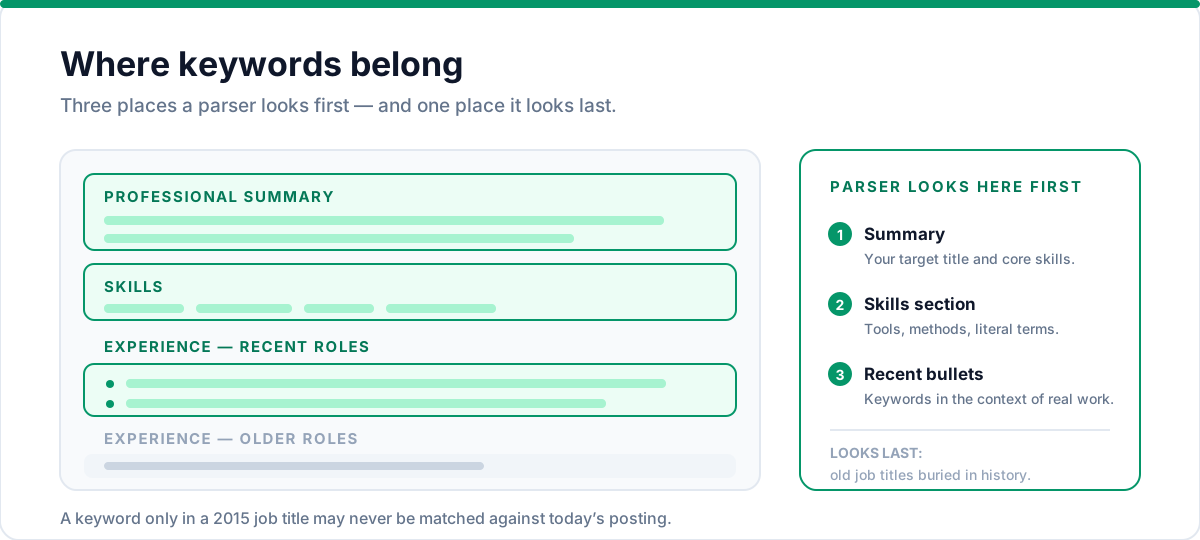
Keywords live in the professional summary, the skills section, and the bullets of your experience. A keyword buried only in an old job title may never be indexed against the current role. Fix: mention your key skills in your summary and in the context of recent, relevant bullets.
10. Hard skills are spelled out
Don't rely on acronyms alone. If you're an expert in CRM administration, list both "CRM" and "Customer Relationship Management" where it makes sense. Parser search matches what's literally in your text. Fix: spell out the most important terms at least once.
11. No keyword stuffing
Stuffing "management, management, management" into white text or a hidden section — one of the most common resume mistakes — isn't a workaround. Modern systems flag manipulation, and a human who notices it will bin your application on principle. Fix: keywords should appear naturally in real sentences describing real work.
Pulling the keywords from a posting takes four steps:
- Extract the literal terms: job title, tools, methodologies, and the responsibilities repeated throughout the posting.
- Copy the exact phrasing. If it says "customer success," use those two words — not a synonym you prefer.
- Place them where parsers look first: your summary, your skills section, and the bullets of your two or three most relevant recent roles.
- Write out important acronyms at least once, so a search for either form finds you.
Content checks
12. Bullets start with strong action verbs
"Managed," "Built," "Led," "Reduced," "Launched." Passive starts like "Responsible for" waste your most valuable line-opening real estate. Fix: rewrite bullets to lead with a specific action verb — see our resume action verbs list for starters.
13. Results are quantified where possible
"Managed a team of 12 across 3 regions" beats "Managed a team." Numbers help ranking systems weight your experience and — more importantly — they're what convinces a human. Fix: add a metric to the biggest claims: scale, time saved, revenue, percentage improvement.
14. Everything is accurate and claim-checkable
The system doesn't check your facts, but recruiters and background checks do. If you're tempted to inflate a title or invent a skill, remember: interviewers will ask. Fix: keep every claim defensible.
15. It fits the role's expectations
A two-page resume for a junior role, or a one-page resume for a senior leadership role, both raise eyebrows. If you're returning from a break, our career gap guide covers how to handle dates. Length matters less than relevance — every line should earn its place for this application. Fix: cut anything that doesn't support the role you're targeting. Not sure on length? Read how long a resume should be.
How to run the checks fast
The quickest way to catch parsing problems is to see your resume as the ATS sees it:
- Copy your resume text — all of it — and paste it into a plain text file. Does it read cleanly top to bottom, with your sections in order? If lines vanish or columns interleave, a parser will mangle them too.
- Check what's missing. Compare the plain-text version against your original: header text, footnotes, and sidebar content often disappear in the copy — which means they can disappear in parsing as well.
- Export to a text-based format (DOCX or text PDF) rather than an image, and keep the file name simple — your name and "resume," no special characters.
- Check your file size — anything over 1MB is suspicious (usually images or embedded fonts).
- Or skip the manual work and paste your resume into the free ATS Resume Checker, which runs the compatibility checks automatically and shows you what to fix.
What to do after you fix something
One pass isn't the end — each fix can introduce a new problem, and every application deserves a fresh check. Build a ten-minute pre-submit routine:
- Run the 15 checks (about five minutes once you've done it a couple times).
- Update the resume for this specific job — mirror its language and reorder to lead with the most relevant experience.
- Re-check that the two or three most important keywords from the posting still appear in your summary and top bullets.
- Export fresh — never send a stale file. Every export should come from your current version so dates and details are consistent.
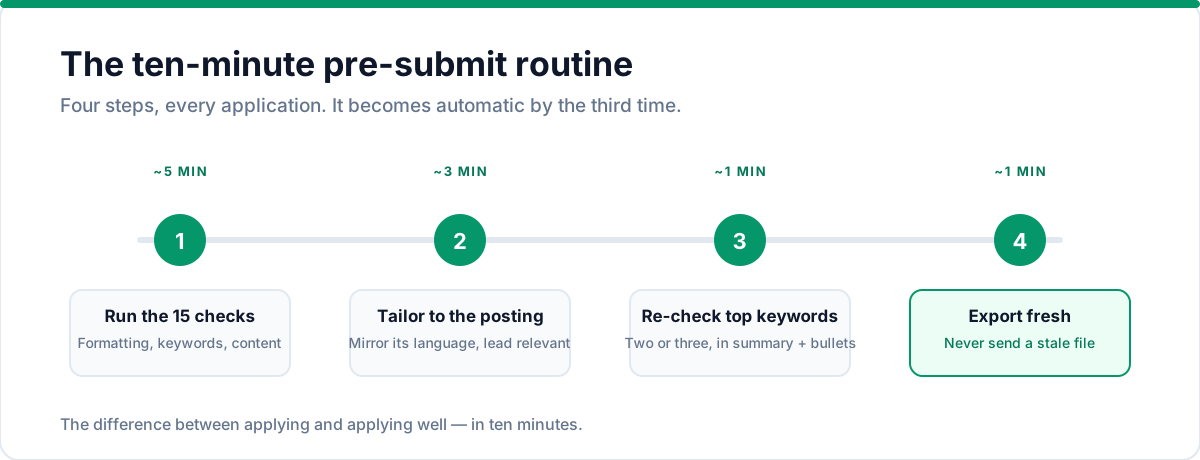
The routine sounds like overhead; in practice it becomes automatic, and it's the difference between applying and applying well.
Tools like Talent & Story's ATS analyzer do this for you: paste your resume, get a compatibility score, and see which of these checks you're failing with specific fixes — try it free before the application goes out.
Frequently asked questions
How often should I run this checklist?
Before every single application. The formatting checks become automatic after a few times, but the keyword and content checks should be fresh for each role. Build a ten-minute pre-submit routine.
Do I need a different resume for every company's ATS?
No. ATS platforms differ in parsing quirks, but the checklist above covers the shared rules. If your resume is clean plain text with standard sections and a strong professional summary, it will parse in nearly every system. What does change per application is your keywords and emphasis — not your formatting.
Should I include a photo?
In most markets, no. Photos add parsing surface area and are ignored or stripped by most systems. Use the space for content instead.
Is DOCX always better than PDF?
DOCX is the safest across the board, but a genuine text-based PDF parses fine in virtually every modern ATS. The rule is: never an image-based PDF. When in doubt, export both and send the format the job portal prefers.
What if a company says it doesn't use an ATS?
Then a human reads your resume directly — which means it still needs to be clean, scannable, and keyword-rich. The checklist never hurts. A resume that parses well is almost always a resume a human reads well too.
My resume is one page. Is that enough room for keywords?
Yes. Keywords belong in the summary, skills, and the bullets of your most recent roles — one page is plenty when those sections are tight. Length is a separate question from keyword coverage.
What if my resume has a career gap?
A gap doesn't affect ATS parsing — the system reads dates, not judgments. But a visible gap might prompt questions from recruiters, so be ready to address it professionally rather than hide it.
The bottom line
None of these checks will guarantee you the interview. But every one of them removes a reason for your resume to be invisible. Formatting gets you parsed, keywords get you found, and content gets you read. Run the checklist, fix what fails, and apply with confidence.
Put this into practice with Talent & Story
Build an ATS-friendly resume, get an instant compatibility score, and manage your entire job search in one workspace.
Written by
Talent & Story Team · Career Workspace
We build Talent & Story — the career workspace for building ATS-friendly resumes, writing cover letters, tracking applications, and preparing for interviews. Every guide is written to be practical enough to use the same day.