Resume Keywords: How to Use Them So Recruiters Find You
Resume keywords are the terms recruiters and ATS search for. Learn to find the right ones for your field, where to place them, and avoid keyword stuffing.
Imagine you're a recruiter looking for a project manager with cloud experience. You've got 400 applications and a search box. What do you type?
"Project manager" plus "AWS." Then you look at who shows up.
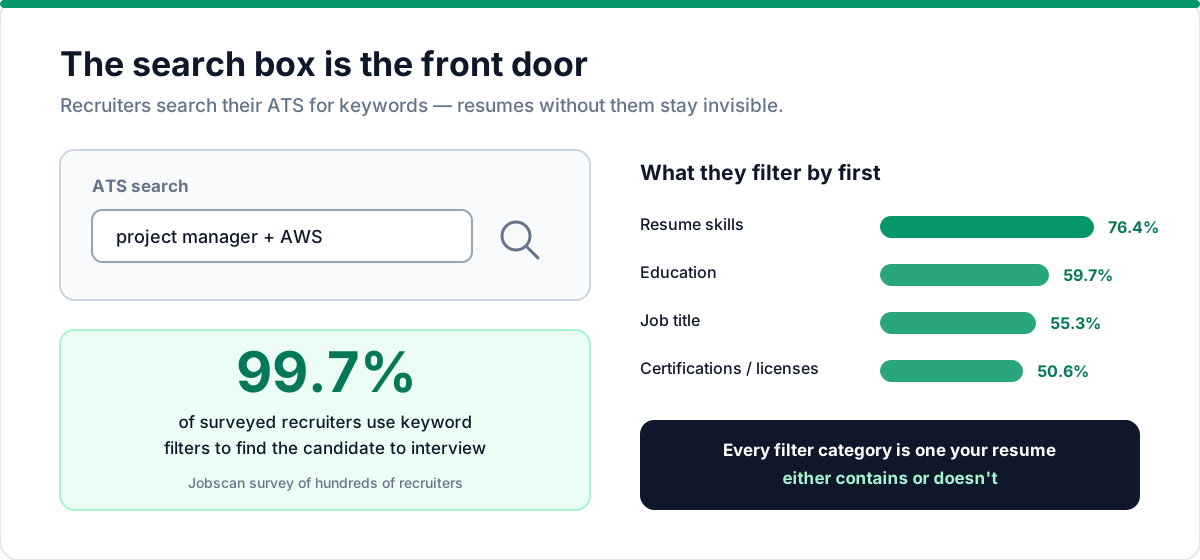
That search box is why keywords are the difference between being found and being invisible — regardless of how good you are. The search is nearly universal: Jobscan's 2026 ATS usage report detected an applicant tracking system at 97.4% of Fortune 500 career pages (487 of 500), and in a Jobscan survey of hundreds of recruiters, 99.7% said they use keyword filters in their ATS to find the candidate to interview. Your resume's job is to contain the words that search finds. Here's how to get that exactly right, without turning your resume into a robot-written list.
What resume keywords are
Keywords are the words and phrases that describe the role you're targeting: job titles, hard skills, tools, methodologies, certifications, and the responsibilities that define the work. In practice, three kinds matter:
- Job titles — "Product Manager," "Data Analyst," "Registered Nurse"
- Hard skills and tools — "Python," "Figma," "SQL," "Salesforce," "React"
- Industry and methodology terms — "Agile," "HIPAA," "GAAP," "CI/CD," "A/B testing"
Soft skills — "leadership," "communication," "team player" — are words too, but they're generic and rarely what a recruiter searches first. They add color in your summary, but they're not the keywords that get you found.
The same Jobscan survey shows what recruiters type first: 76.4% filter by resume skills, 59.7% by education, 55.3% by job title, and 50.6% by certifications or licenses. Every one of those is a keyword category your resume either contains or doesn't.
Where keywords come from
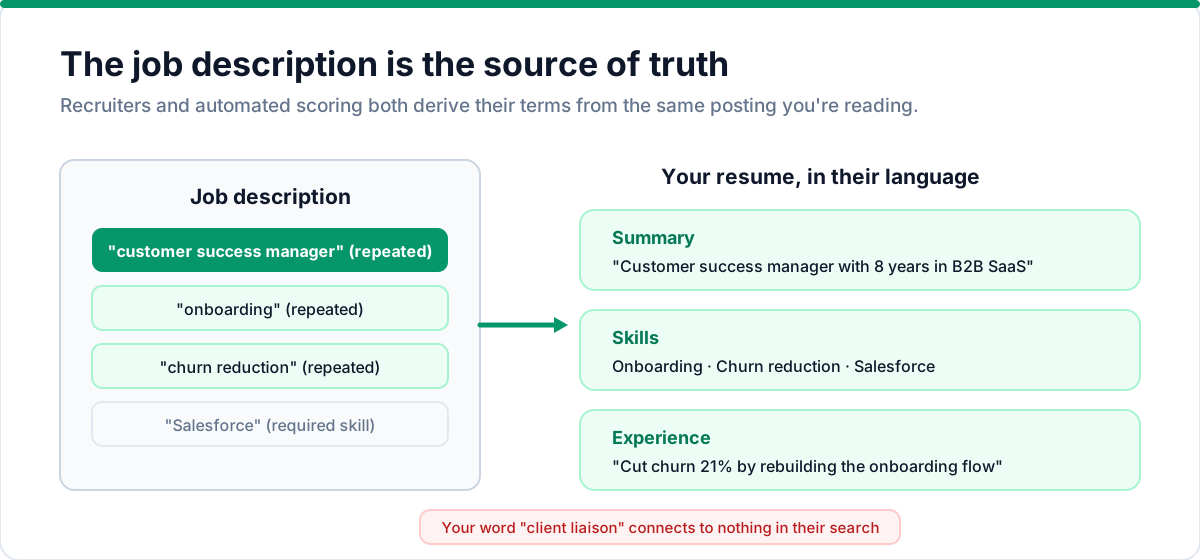
The job description is your source of truth. Recruiters and automated scoring both derive their terms from the same posting you're reading. That means the exact phrases in the description are the exact phrases that matter.
If the description says "customer success manager" and your resume says "client liaison," the system won't connect the dots. Use their language.
How to find the right keywords
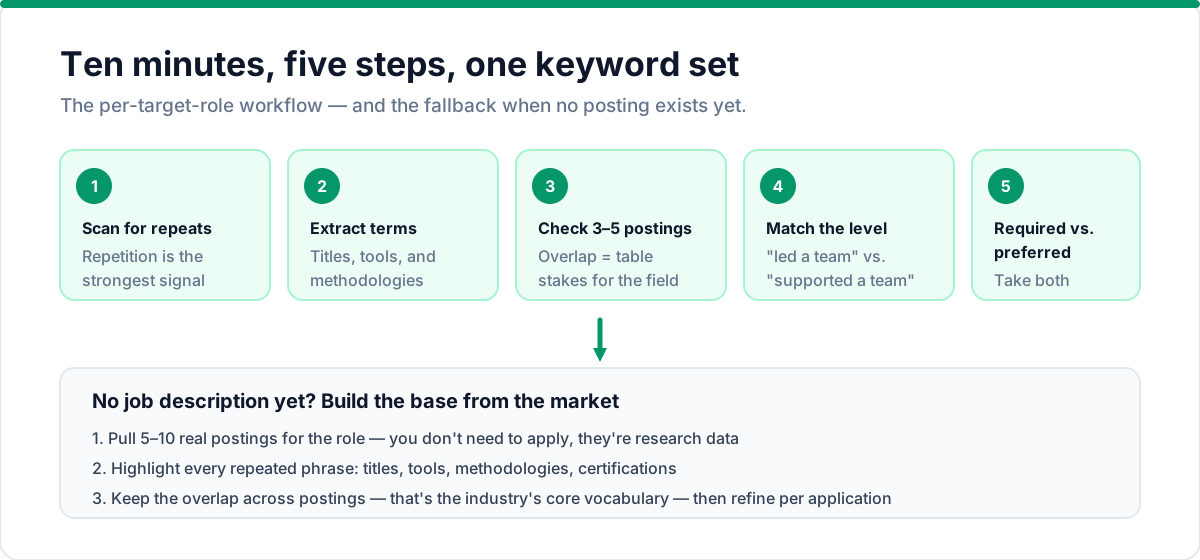
Do this in ten minutes, per target role:
- Open the job description and scan for repeated terms. Repetition is the strongest signal — the description literally tells you what it's ranking for.
- Extract titles and skills. List every job title, tool, and methodology mentioned.
- Check three to five similar postings for the same role and note the overlap. Keywords that appear in most of them are table stakes for your field.
- Match your level. A senior role uses different vocabulary than an entry-level one ("led a team" vs. "supported a team"). Mirror the level, not just the function.
- Scan for required vs. preferred. Required skills are non-negotiable keywords. Preferred ones are bonuses — include them if you genuinely have them.
Keyword research when there's no job description yet
Sometimes you're building a general resume or targeting a field rather than a specific posting. In that case, generate your keyword set from the market itself:
- Pull five to ten real job postings for the role you want (LinkedIn, Indeed, company career pages). You don't need to apply — they're research data.
- Copy them into a document and highlight every repeated phrase: titles, tools, methodologies, certifications.
- Watch for the overlap. Terms appearing across most postings are the industry's core vocabulary for that role — those are your keywords.
- Note the level differences. Senior postings emphasize strategy and ownership ("led," "roadmap," "stakeholder management"); junior postings emphasize execution ("supported," "assisted," "collaborated"). Match the vocabulary of the level you're targeting.
This gives you a keyword base for a general resume. Then, for each specific application, you refine it against that job's posting using our tailoring method.
Example keyword sets by role
To make it concrete, here's what the core keyword set looks like for three common roles:
Product Manager: roadmap, discovery, user stories, prioritization, go-to-market, SQL, A/B testing, stakeholder management, metrics, product analytics, Agile, SCRUM.
Software Engineer: React, TypeScript, Node.js, REST APIs, CI/CD, Docker, AWS, unit testing, code review, system design, performance optimization, agile development.
Digital Marketer: SEO, SEM, content strategy, conversion rate optimization, Google Analytics, email marketing, paid social, funnel analysis, landing pages, brand awareness, lead generation.
Notice the pattern: specific tools, specific methodologies, concrete responsibilities. Nothing on the list is a soft skill, because soft skills rarely get searched. Your industry has a vocabulary like this — your job is to name the version that applies to you.
Hard skills vs. soft skills
When recruiters search an ATS database, they search for hard, specific terms — tools, technologies, certifications, concrete responsibilities. "Python" gets searched. "Passionate" doesn't.
So prioritize your hard skills — and open every bullet with a strong action verb:
- Lead with the specific, searchable terms in your skills section and summary
- Use soft skills sparingly — a mention in your summary is fine; a list of ten of them in your skills section is noise
- Include certifications and licenses — they're highly searchable and hard to fake
Where to place keywords
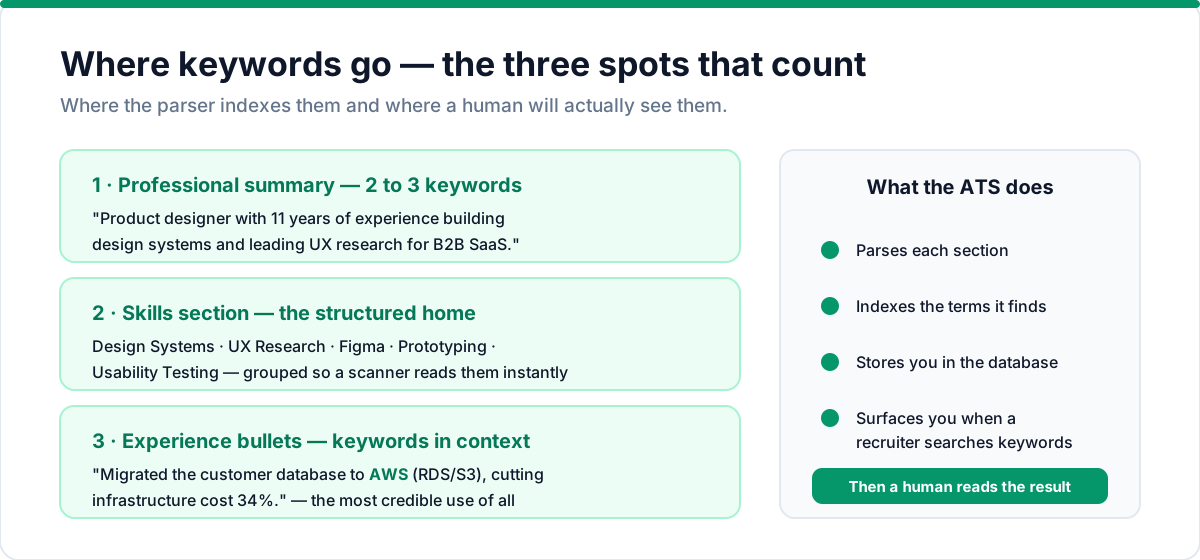
Placement matters because keywords need to appear where the parser indexes them and where a human will actually see them. The ATS-friendly format ensures your keywords survive parsing. Three spots cover most of the value:
1. Professional summary (2–3 keywords). "Product designer with 11 years of experience building design systems and leading UX research for B2B SaaS." — One sentence, three searchable phrases. Our summary vs. objective guide shows how to position this section for your career level.
2. Skills / core competencies section. This is the structured home for your keyword list. Group them so a scanner can read them instantly: "Design Systems," "UX Research," "Figma," "Prototyping," "Usability Testing."
3. Experience bullets (keywords in context). "Migrated the customer database from legacy on-premise servers to AWS (RDS/S3), cutting infrastructure cost 34%." — The keyword in context is the most credible use of all, because it proves real work.
Mirror the description's exact phrases
This is the highest-leverage habit in all of resume optimization: when the job description says "revenue forecasting," write "revenue forecasting" — not "predicting income." It feels mechanical, and that's fine. Search is literal. You're writing for the search that finds you, then for the human who reads the result.
How to avoid keyword stuffing
The failure mode is a resume that reads like a ransom note of terms:
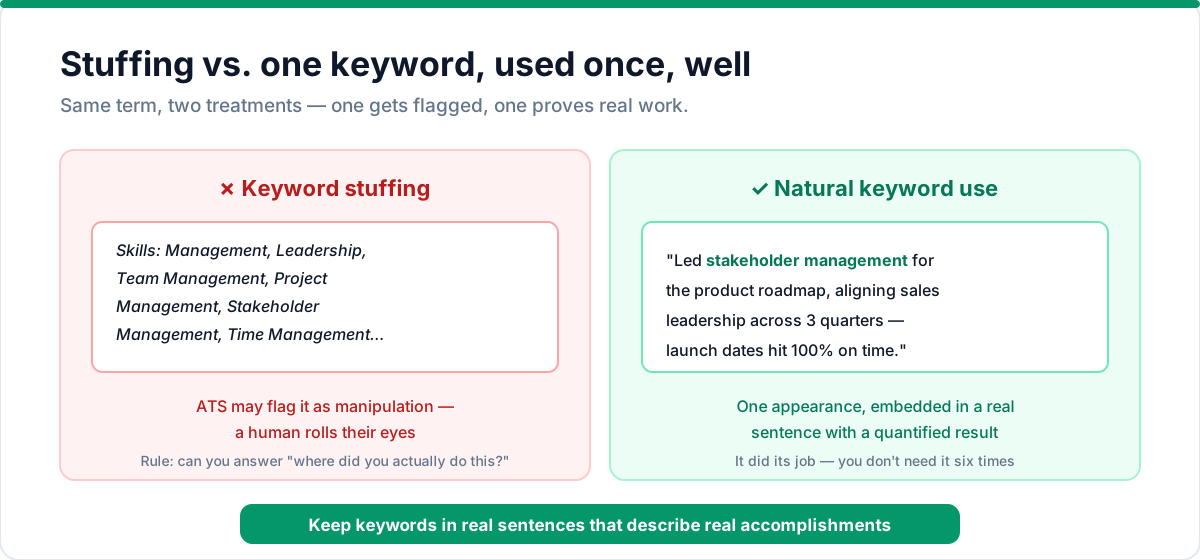
Skills: Management, Leadership, Team Management, Project Management, Stakeholder Management, Time Management, Stress Management…
That hurts you twice: an ATS may flag it as manipulation, and a human will roll their eyes. Keyword stuffing is one of the most common resume mistakes — and one of the easiest to fix. The fix is to keep keywords embedded in real sentences that describe real accomplishments. If "stakeholder management" appears once in a bullet that describes aligning a product roadmap with sales leadership, it did its job. You don't need it six times.
Rule of thumb: every keyword on your resume should be able to survive the question, "Where did you actually do this?" If you can't answer, cut it.
The one-page check: does your resume get found?
After you optimize, test it the way a recruiter would. Open your own resume and use your browser's find function (Ctrl+F) to search for the top five keywords from the job description. If all five appear in sensible places, you're in good shape.
That manual test approximates what an ATS analyzer does automatically — and it's worth doing for every serious application. In Talent & Story, paste a job description and the Job Match tool scores your resume against it, lists the missing keywords, and tells you which sections need the most work. Much faster than a control-F ritual — try it free.
Frequently asked questions
How many keywords should be on a resume? There's no magic number — focus on covering the job description's top 10–15 repeated terms across your summary, skills, and experience sections. Quality and natural placement matter more than quantity.
Can I put keywords in white text to trick ATS? No. Modern ATS systems detect invisible text and flag it as manipulation. This practice can get your application auto-rejected. Earn your keywords by placing them in real sentences about real work.
Do keywords matter for LinkedIn too? Yes — LinkedIn's search algorithm works similarly to ATS systems. Use the same keywords in your headline, summary, and experience sections. The overlap between your resume and LinkedIn profile strengthens your overall digital presence.
How do I find keywords for a career change? Pull 5–10 job postings for the role you're targeting and identify the repeated terms. Then map your transferable skills to those terms using the language of the new field. Our tailoring guide covers this process in detail.
Should I repeat keywords across different sections? Yes — natural repetition across your summary, skills, and experience sections signals relevance to ATS systems. But don't force it. If a keyword fits in two sections, use it. If it only fits in one, that's fine.
Do soft skills count as resume keywords? They're words, but they're rarely what recruiters search for. "Python" gets searched; "passionate" doesn't. Use soft skills sparingly in your summary, and prioritize hard skills and tools in your skills section.
How often should I update my keywords? Refresh your core set whenever your target role shifts — new tools become table stakes, and job descriptions start using new phrasing. The fastest way to stay current is the same ten-minute scan of fresh postings you used the first time.
The bottom line
Keywords are how you get found, and the job description is the source of truth for which ones matter. Extract the repeated terms, mirror the exact phrasing, place them in your summary, skills, and experience bullets, and never stuff. Do that for every application and you've removed the most common reason strong candidates never get seen — for our full formatting checklist, see the 15-point ATS resume checklist. And if you're writing bullets to carry those keywords well, structure them the right way.
Your resume should say what you do in the language your field searches for. Get the words right, and the interviews are earned by everything after.
Put this into practice with Talent & Story
Build an ATS-friendly resume, get an instant compatibility score, and manage your entire job search in one workspace.
Written by
Talent & Story Team · Career Workspace
We build Talent & Story — the career workspace for building ATS-friendly resumes, writing cover letters, tracking applications, and preparing for interviews. Every guide is written to be practical enough to use the same day.