Job Search Tracker: The System That Keeps You Organized
A job search without a tracker leaks applications and follow-ups. Here's the system - stages, next actions, and weekly reviews - that keeps you moving.
You applied to thirty roles last month. How many are still open? How many did you follow up on? Which ones are waiting on you?
If you hesitated on any of those, you already know why most job searches stall: they're not tracked. The volume is why structure matters — recruiters now process an average of 291 applications per hire, roughly triple the ~100 of early 2021, according to Ashby's 2026 Talent Trends analysis of 109 million applications. Applications get submitted and then quietly evaporate, and the search becomes a pile of "I think I applied there" instead of a pipeline you can steer.
A job tracker fixes that. Here's the system — simple enough to start today, structured enough to actually work.
Why track a job search at all
Three reasons, in order of importance:
- Follow-up becomes possible. The difference between a good and a great search is follow-up — sending a thoughtful note, updating a contact, re-applying when a role reposts. You can't follow up on applications you've forgotten. Our follow-up guide covers the exact timing and templates.
- You see the leak points. Tracked searches reveal the truth: where applications stall, which channels produce interviews, and whether you're spending effort where it pays. Untracked searches are vibes.
- You can tell a better story. When a recruiter asks "what else are you looking at?" — and they will — you'll have an answer that sounds organized, not scattered.
And the timeline rewards patience you can only sustain if you're tracking: the same Ashby analysis puts the median time to first fill at 56 days for business roles and 76 days for technical roles — eight to ten weeks of ordinary silence. Without a record of when you applied and when you followed up, that silence reads as failure instead of math.
The core pipeline: five stages
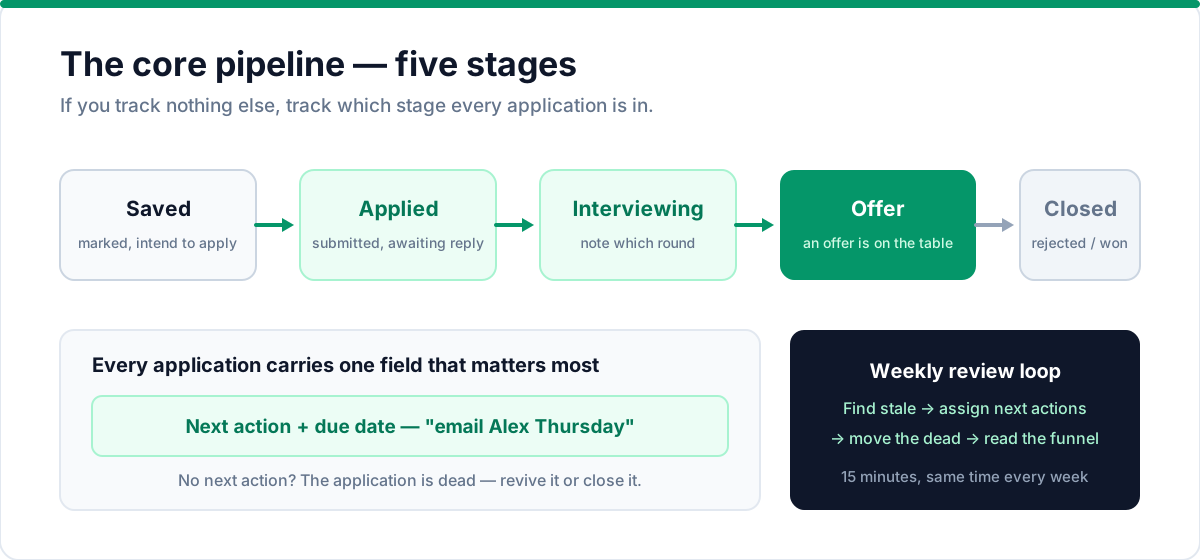
Every application lives in one of five stages. If you track nothing else, track this:
- Saved — you've marked the role and intend to apply (this is where every new lead starts)
- Applied — application submitted, waiting on a response
- Interviewing — actively interviewing; note which round
- Offer — an offer is on the table
- Closed — rejected, withdrawn, or accepted
That's it. Five buckets. Every application moves forward through them, and the pipeline picture — how many at each stage, how many are stale — is your search's health dashboard.
What to record per application
Keep it useful, not obsessive. For each role:
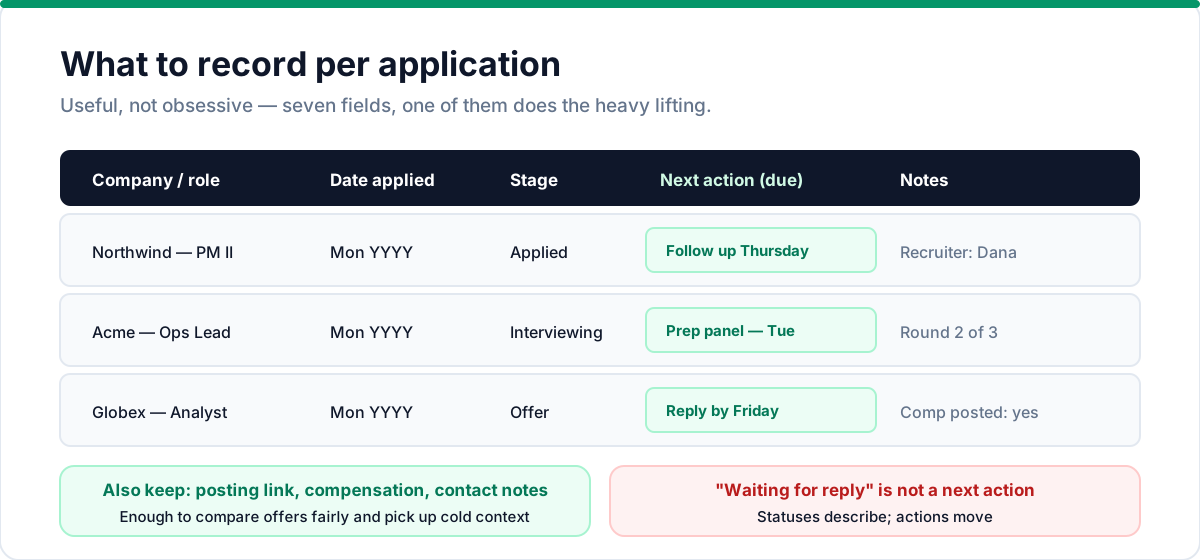
- Company and role title
- Link to the posting
- Date applied
- Current stage
- Next action and its due date (this is the most important field)
- Compensation, if posted, so you can compare offers fairly
- Notes: contact name, recruiter, or anything you learned
That last point — next action — is what separates this system from a list. "Waiting for reply" is a status, not an action. The real next action is "email [name] on Thursday," "follow up Tuesday," or "research team before phone screen." If an application has no next action, it's dead — either revive it or close it.
The weekly review (15 minutes)
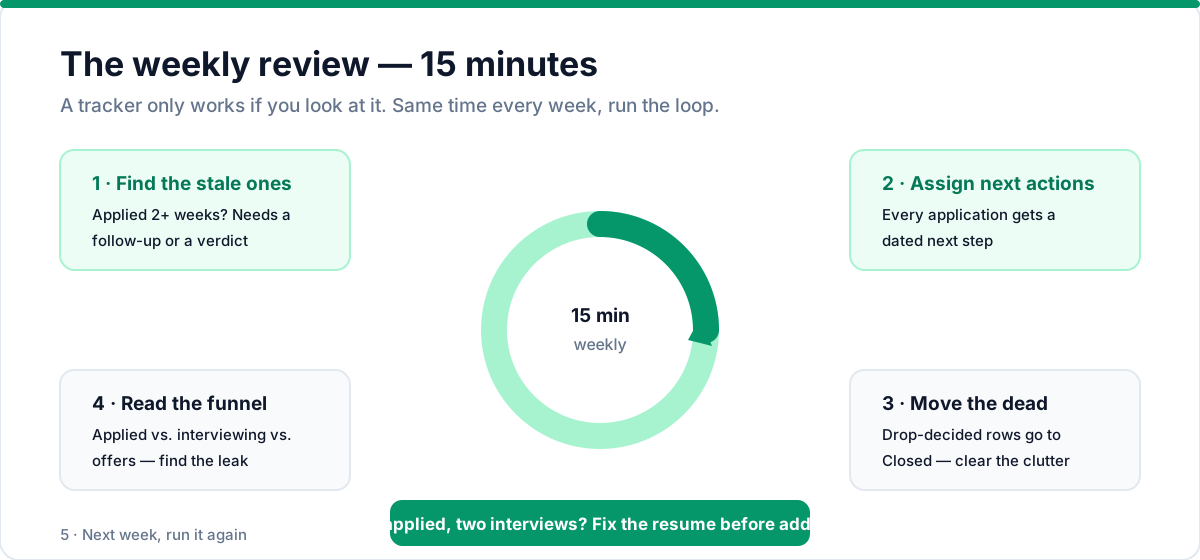
A tracker only works if you look at it. Block fifteen minutes every week and run this loop:
- Find the stale ones. Anything sitting at Applied for two weeks or more needs a follow-up or a verdict.
- Assign next actions. Every application gets a dated next step.
- Move the dead. Applications you've decided to drop go to Closed — don't let them clutter the pipeline.
- Look at the funnel. Applied vs. interviewing vs. offers. If you have hundreds of applications and two interviews, the leak is in your resume or targeting — read our tailoring guide next.
Fifteen minutes a week turns a chaotic job hunt into a system you trust.
What your tracker tells you (reading the data)
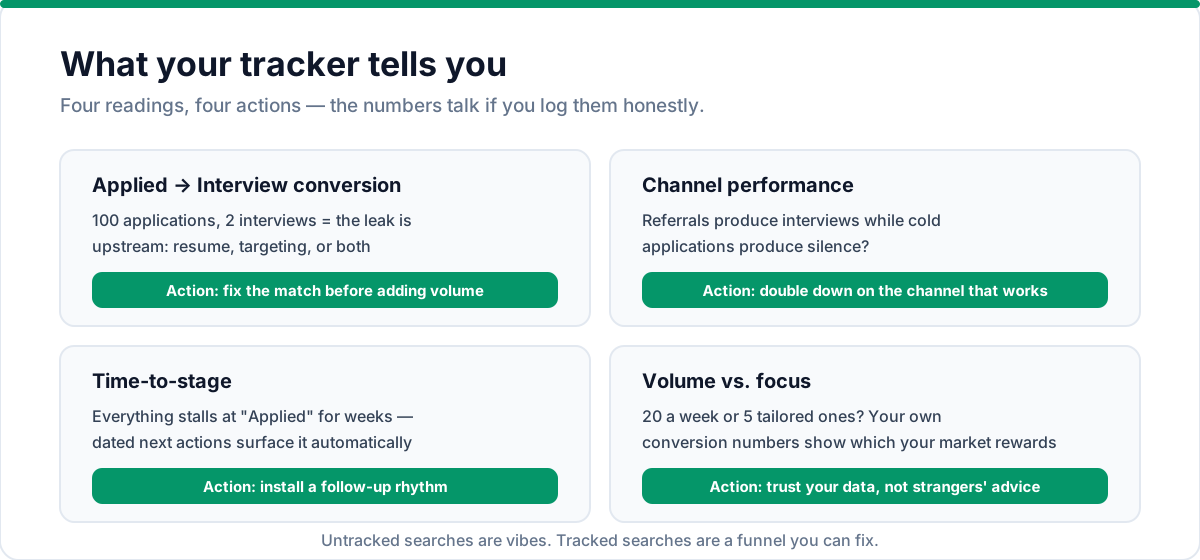
After a few weeks of honest tracking, the numbers start talking — and they're usually the last thing a job seeker wants to hear:
- Applied → Interview conversion. If you've applied to 100 roles and interviewed twice, the problem is upstream: your resume, your targeting, or both. Fix the resume match before adding more volume — start with a strong resume and the right keywords. More applications to a broken funnel just fills the funnel faster.
- Channel performance. Did the referrals produce interviews while the cold applications produced silence? That's data telling you where to spend your energy — double down on the channel that works, which is exactly why referrals matter so much.
- Time-to-stage. If every application stalls at "Applied" for weeks, your follow-up rhythm is the missing piece. A tracker with dated next actions surfaces this automatically.
- Volume vs. focus. Some searches need 20 applications a week; some need five carefully tailored ones. Your own numbers will show which style your market rewards — trust the data, not the advice of strangers on the internet.
Red flags your tracker will expose
Three patterns are worth catching early, and all three only show up when you track:
- A bloated "Applied" pile. More than a few weeks of silent applications means you're treating the search as submitting, not as a process. Check if your resume summary is doing its job.
- No interview movement. A funnel full of "Applied" with nothing moving to "Interviewing" is a resume problem, not a market problem.
- Losing track of companies. If you can't name the last ten places you applied to off the top of your head, your search has outgrown your memory — the tracker isn't optional anymore, it's the minimum.
Tools: from spreadsheet to tracker
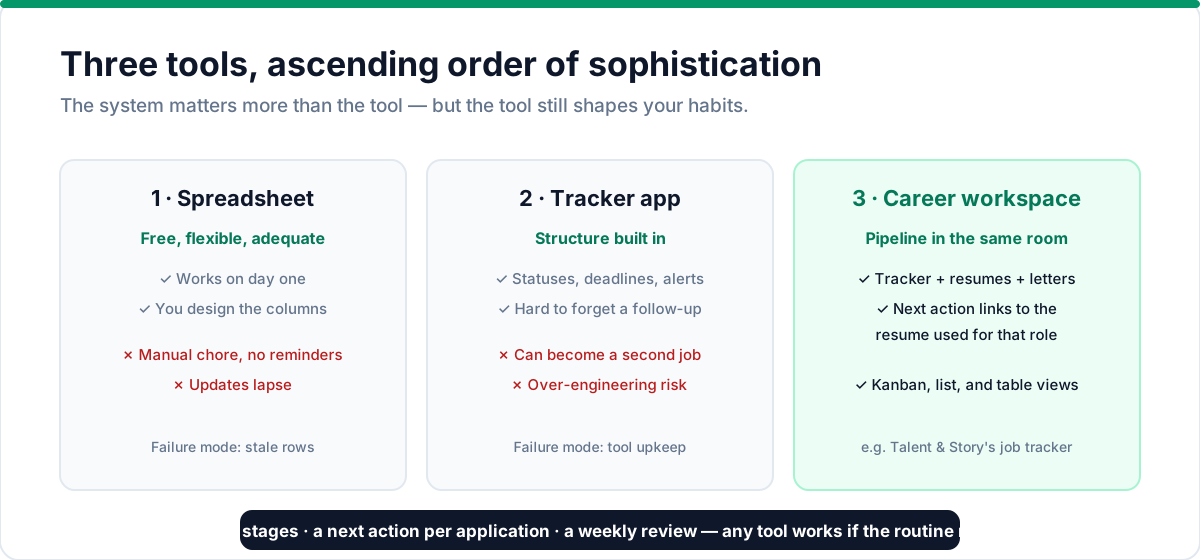
You have three options, in ascending order of sophistication:
A simple spreadsheet. Columns for the five fields above, one row per application. Free, flexible, and perfectly adequate — the main failure mode is that it's a manual chore with no reminders, so updates lapse.
A dedicated tracker app. The advantage is structure: statuses, deadlines, and reminders built in. The risk is over-engineering — some tools make tracking the search a second job.
A career workspace like Talent & Story, where the tracker is part of your application kit. The same tool that holds your resume and cover letters also holds your pipeline, so your tracker is always in the room where the applications happen — and your next action links back to the resume you used for that role.
Whichever you choose, the system matters more than the tool. Five stages, a next action per application, a weekly review. Any tool will work if the routine runs.
Handling the volume
Searching aggressively can mean 15–25 applications a week, and at that volume the tracker is the strategy. A few rules keep high volume from becoming chaos:
- Batch your work. Set aside application blocks and handle only the ones you've saved; don't apply reactively all day.
- Tier your effort. Not every role deserves a custom cover letter. Referral applications and dream roles get the full ten minutes; quick applications get a strong base resume and a targeted summary.
- Weekly, not daily. Look at the pipeline once a week. Daily checking breeds anxiety, not action. Use the time to prepare for interviews instead.
Frequently asked questions
Do I need a separate tracker for each job search? No — one tracker works for all concurrent searches. Use the stages to separate applications by company, and your weekly review will surface which search needs attention. The key is one system you actually use.
What if I'm applying to 50+ roles a week? At that volume, focus on the pipeline stages and next actions — don't obsess over notes for every application. The tracker's value is in the funnel view: where are things stalling, and what's the next move? Keep it simple.
Should I track networking contacts too? Yes — add them as a separate view or tag them. A networking contact is a lead, just like a job posting. Track the last touch date and next action so follow-ups don't slip.
How long should I keep closed applications in the tracker? Keep them for at least six months. Closed rows are how you remember which companies you already applied to, what you said in each interview, and whether to reapply when a role reposts. Archive older rows once the memory stops being useful.
How do I know if my tracker is working? You'll see three things improve: fewer missed follow-ups, faster movement from Applied to Interviewing, and less anxiety about "what did I apply to?" If those aren't improving, simplify the system.
Can I use a notes app instead of a spreadsheet? Yes, as long as it has a way to sort by date and show next actions. A notes app without structure becomes the same chaos you started with — the system matters more than the tool.
What's the biggest mistake people make with trackers? Building an elaborate system and then not using it. Start with five columns (company, role, date applied, stage, next action) and add fields only when you need them.
A note on the emotional side
A job search is an emotional process wrapped in logistics, and the tracker quietly helps with the emotion too. It gives you three things rejection-heavy weeks take away: a record of your effort (evidence you're doing the work, even when results lag), an honest funnel (so you can fix problems instead of spiraling about them), and a sense of motion (every next action is a small thing you control).
When you're tempted to check your inbox for the fifth time in an hour, open the tracker and update a next action instead. It converts anxiety into a task — and tasks are things you can finish.
The bottom line
A job search is a sales pipeline with you as the product. Treat it like one: five stages, a next action for every application, and a weekly review that keeps the whole funnel moving. Tracked searches convert better, feel calmer, and end faster — and they stop the quiet bleed of "I think I applied to that."
Talent & Story's job tracker gives you the kanban, list, and table views of this exact system, linked to the resumes and cover letters you used for each application — so your next action is always one click away. Start free and take control of your search.
Put this into practice with Talent & Story
Build an ATS-friendly resume, get an instant compatibility score, and manage your entire job search in one workspace.
Written by
Talent & Story Team · Career Workspace
We build Talent & Story — the career workspace for building ATS-friendly resumes, writing cover letters, tracking applications, and preparing for interviews. Every guide is written to be practical enough to use the same day.